
Website Audit and Executive Report
We examine your URL or site package and deliver the risks, affected pages and business priorities as a clear executive brief, detailed technical annex and prioritized action plan.
A baseline that touches nothing
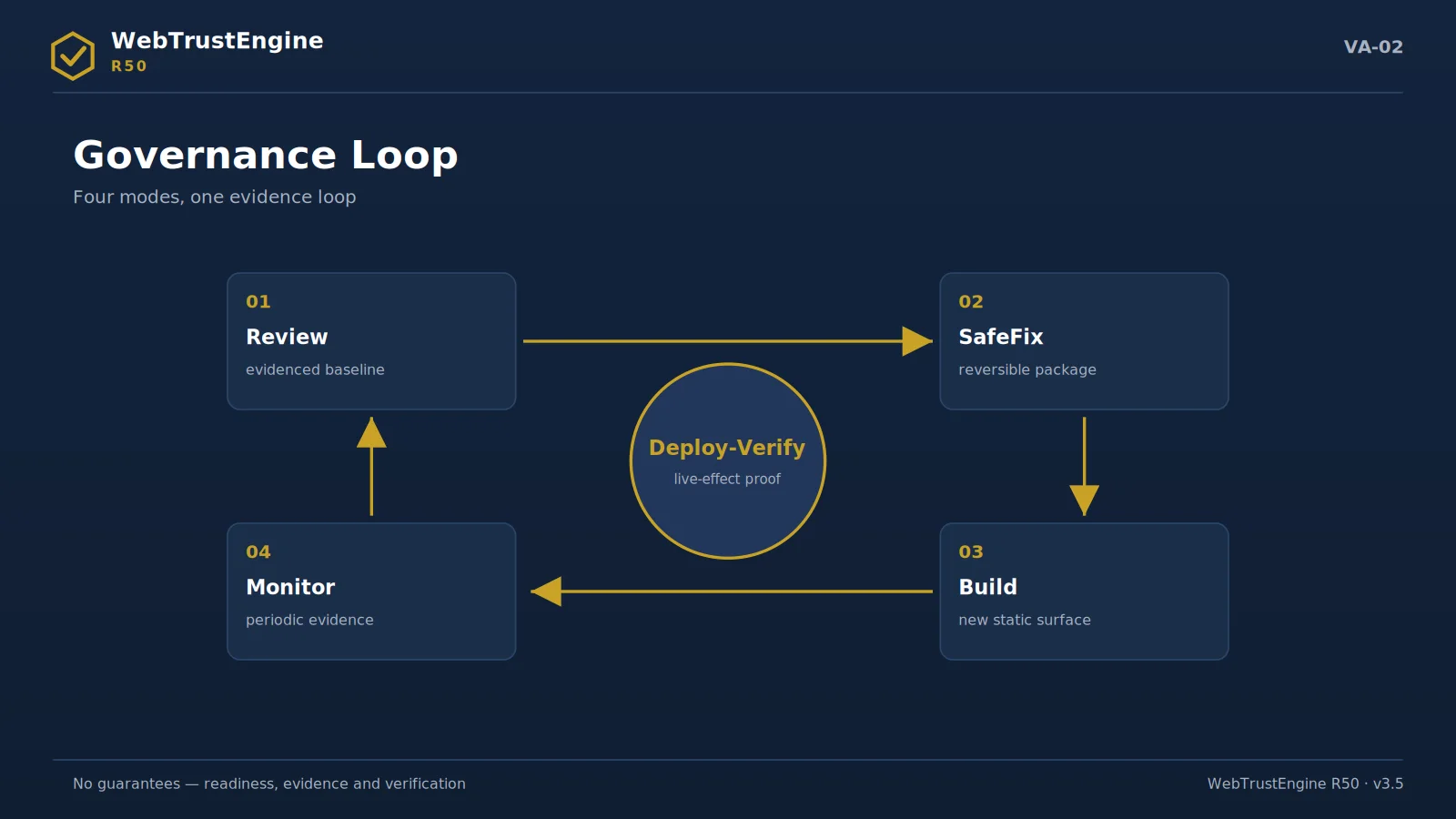
The evidence flow: before, fix, verify, report.
Review is WebTrustEngine's decision surface that changes no files. It supports three input types: a ZIP package, a local folder and — with ownership/authorization — a live URL. ZIP review is ideal for seeing the integrity and hygiene of a delivered package; a local folder enables fast iteration on a development copy; live-URL review reads real response headers and publish behaviour, and is done only with authorization.
Which one to choose depends on the question itself: 'what did the agency deliver' wants a ZIP; 'where are we before go-live' wants a local folder; 'what actually returns live' wants a live URL. In all three modes Review modifies nothing; it only reads, classifies and reports.
The decision surface is built to answer: Where is the risk? Which domains score high? Which findings close via file fixes? Which need an external platform? Which need live verification? Which decision is the owner's commercial call? These six questions are what the executive wants on one screen.
Review outputs include the 10-domain score table, the findings list (domain/severity/file), the catalog-class distribution and the suggested next step (SafeFix scope + external-action list). Risk level derives from finding density and severity; there is deliberately no single 'pass/fail' stamp, because the decision belongs to context.
- ZIP: delivery audit
- Local folder: pre-launch iteration
- Live URL: only with authorization
- No file changes; a decision surface forms
Use cases
The customer journey: five stops from review to verified deployment.
Corporate site pre-redesign
Before the redesign budget is approved, Review produces the evidence snapshot of the current asset: what is worth preserving and what is debt. After the redesign, the same baseline is the measurement ground for 'did it really improve'.
Typical evidence output: Baseline report + keep-list
First step: Review — with the current ZIP
Live-site trust readiness
For a live site, SafeFix + Deploy-Verify raise readiness from security headers to social preview without risk; every step moves under rollback protection.
Typical evidence output: Fixed ZIP + rollback + diff report
First step: Review + SafeFix scope approval
SEO / GEO / AEO readiness
Before content investment, the technical base and AI-readability signals are established; investment lands on crawlable, answerable ground.
Typical evidence output: Technical-base score + AI-signal list
First step: Review — before the content plan
Multilingual site audit
Audits hreflang, identity consistency and per-language meta discipline in one report; silent drifts between language copies become visible.
Typical evidence output: Language-consistency table + hreflang findings
First step: Review — with all language copies
Agency delivery audit
The delivery ZIP goes through Review: promised quality is confirmed with evidence, gaps are classified; acceptance rests on a document.
Typical evidence output: Acceptance document: findings + class + decision
First step: Review — on the delivery ZIP
Investor / corporate trust document
The evidence package (scores, changed files, verification plan) attaches to the due-diligence file; 'the web asset is governed' becomes a document.
Typical evidence output: Evidence-package annex (scores/files/plan)
How to read the report
Score table
10 rows, internal readiness out of 100. Reading order: the three lowest domains → their entries in the findings list → which class (file/live/external/manual).
Findings list
Domain · severity · file · class columns. 'High severity + ENTEGRE' rows are first SafeFix candidates; 'MANUAL' rows go to the approval queue.
Rollback manifest
Verify the backup_dir path and the two lists (changed/created); archive it. A reversal drill is five minutes of cheap insurance.
Deploy-Verify diff report
Compare expected ↔ live columns; an 'expected present, live missing' row is a cache or server-processing issue — check purge first.
Preparing the first review
Eight preparation items to get the most from the first run
• The full site ZIP: From the root, with all assets; a partial folder yields missing-signal noise.
• The domain list: Primary plus subdomains if any; needed for identity consistency.
• The language inventory: Which languages are live; the hreflang audit builds on it.
• The access note: If live-URL mode is wanted, the ownership/authorization letter is prepared.
• Existing policy info: Any server CSP/redirects are declared; double-policy risk is avoided.
Executive decision panel
Decision Panel

SIX QUESTIONS Six decision questions in one sitting
Where is the risk?
The score table shows 10 domains out of 100; the two lowest set the first meeting's agenda.
What closes with files?
Some findings close with direct file fixes; they enter the proposed SafeFix scope.
What needs a platform?
Work living in DNS, CDN or hosting panels is split out as external action recipes.
What needs live proof?
Header processing, redirects, certificates prove themselves only in production; they go on the bridge list.
What awaits approval?
Items demanding content or design judgement are never automated; they sit visibly in the approval queue.
What's next?
The report ends with a proposed SafeFix scope and the external list: the meeting closes with a to-do, not a debate.
THE OUTPUT SET Five output cards: what you actually receive
Score table
10 domains × 100 points; the basis of every before/after comparison.
Findings list
Classified by domain, severity and file; every row has an address.
Status distribution
What is engine output, what is a bridge, what is a recipe, what is an expert item.
Executive summary
A one-page decision narrative in number-contract language.
Scope proposal
Suggested SafeFix file classes plus the external action list.
These five outputs arrive in one package, all archivable as text and files. A Review changes none of your files — which is why the same package can be honestly compared with a second baseline six months later.
WHEN TO USE IT When is Review the right first step?
Three situations make Review the correct opening move. Takeovers: a new site, a new agency or a new manager starts from an evidenced picture of the present. Pre-investment: before a redesign, migration or campaign spend, you see the ground the money lands on. Periodic audit: quarter or half-year baselines taken with the same frame turn improvement from anecdote into a curve.
When Review is not the answer is equally clear: 'fix the site today'. The engine answers that request in order too — photo first, SafeFix second — because the only way to prove what was fixed is to document the state before fixing.
SECTORS Sector scenarios
The same frame needs different emphasis by sector; the notes below say where to look on the first run.
Finance / investment
Security headers and privacy visibility lead; claim language (returns/success) passes the claim-safety filter; legal texts stay in the owner's commercial-decision class.
Media / news
Structured data (Article/Person) and author-date signals are critical; social-preview integrity binds to Deploy-Verify at each publish.
Technology / SaaS
Heading hierarchy and code-sample accessibility on docs pages; AI readability (llms.txt) should be set early.
Healthcare
Content accuracy centers the manual layer; schema is built to avoid medical claims; privacy signals are tightly audited.
Education
Multilingual consistency and the static accessibility set lead; event/course schemas are added via conditional rules.
E-commerce (info layer)
Product schema only on real product pages; performance readiness and preview cards bind to the campaign rhythm.
Public / NGO
Accessibility and transparency texts take priority; document/PDF link hygiene is specially flagged in Review.
Agency / studio portfolio
Its own site is showcase evidence: a sample evidence package is published; before/after table language replaces claim numbers.
FROM THE FIELD
What a Review looks like in practice
A Review begins with a promise that shapes everything after it: not one file will change. The site — or its export — is read as-is, and every observation is written down as a classified finding with its evidence attached: the file, the line, the pattern that triggered it. Because nothing moves, the baseline is repeatable; run it again tomorrow on the same files and the same picture returns. That repeatability is what makes the before/after comparison in later modes honest.
The deliverable is layered for two audiences at once. The executive layer is the 10-domain score and a findings map ranked by class — enough to decide scope and sequence in one meeting. The technical layer is the full evidence file: every finding, every path, every recommended next step, separated into what SafeFix can take, what needs an external recipe, and what waits for expert judgement. The report never issues a pass or a grade; it issues a position — where the site stands today, stated in a form a team can act on and an auditor can re-derive.
Quick answers
Does it touch files?
Does it hit live?
Only with ownership/authorization.
Pass/fail?
No; a context-owned decision surface.
How long?
Depends on site size; output structure is constant.
Report format?
Score + findings + class distribution + suggestion.
Next step
ZIP, local folder or authorized live URL: a risk map and decision surface with zero file changes.